Symbols are available and can be used in SurvCE or SurvPC.
- Symbol library available from Knowledge Base Article 724
- How to customize symbols Knowledge Base Article 766
To use symbols in SurvPC, you will need to copy the Symbol folder into the following folder which is operating system (OS) dependent:
If the OS is Windows XP:
C:\Documents And Settings\[login name]\Application Data\Carlson Software\SurvPC Settings
If the OS is Vista, Windows 7 or later:
C:\Users\[login name]\App Data\Roaming\Carlson Software\SurvPC Settings
In either scenario, the easiest way to locate the folder is to perform the following steps:
- Exit from SurvPC if it is running.
- From the Start button, choose Run.
- In the Run dialog box, key in %AppData% and click OK.
- "Drill down" to the Carlson Software\SurvPC Settings folder and locate a Symbols folder there.
!!!PLEASE NOTE:
After following the steps above you will need to apply the setting below before the symbols will be displayed: ***In SurvPC 6.0 and higher tap Survey / Store Points then tap the icon in the bottom left to open the "View Options" then check the box for "Use Symbols From FCL" then tap the green check in the top right to save and apply the changes.
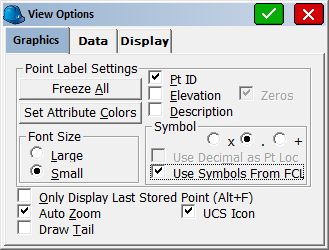
If this box is unchecked your symbols will not be displayed!!!
Links: |
Attachments: |
Keywords: |